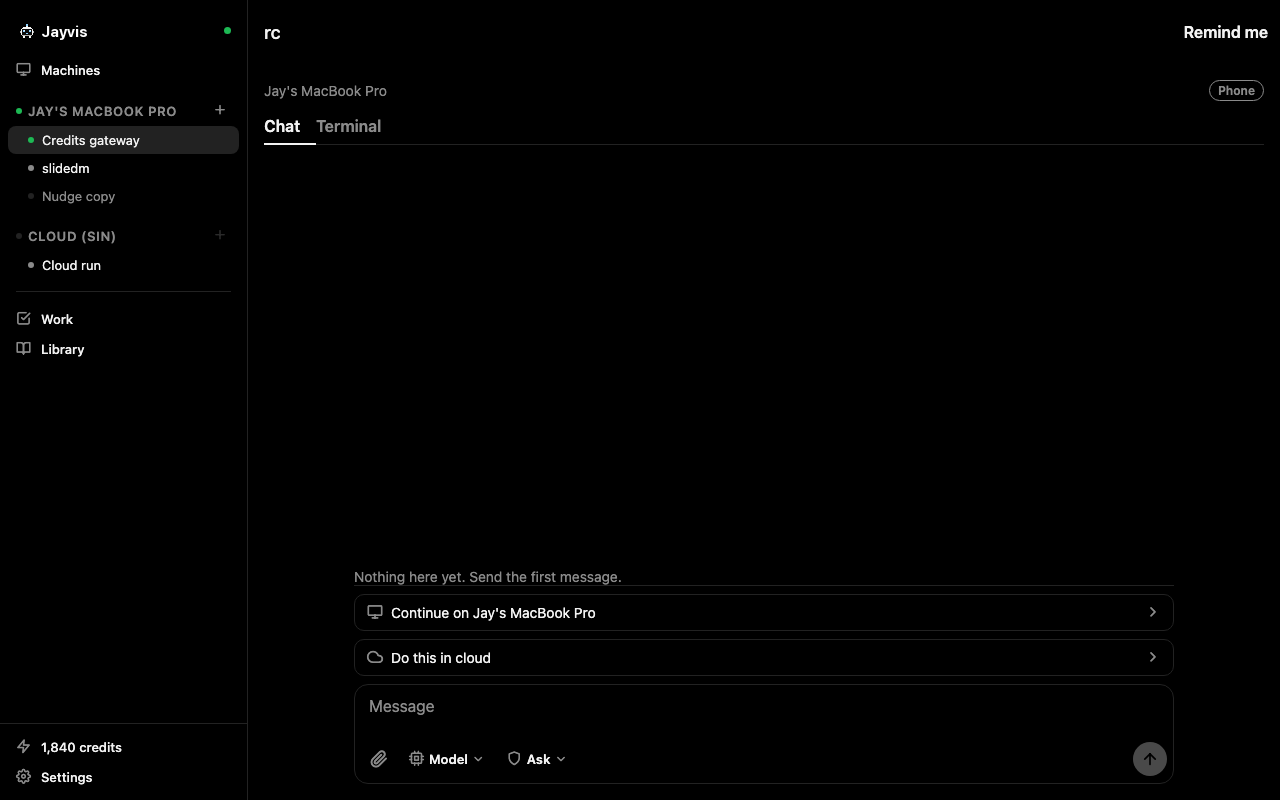
Remote control
See your Mac's screen live on your phone and take over. Slide to move, tap to click, two fingers to scroll, and a keyboard when you need one.
Muse, but make it yours
Name it, give it a face, text it a task. JayWin runs Claude and GPT, the smartest models out there, on a computer you actually own. Your Mac, or a cloud machine you can see, tweak and take over anytime.
Free to start. No card. No Mac needed.
Why JayWin
Claude and GPT, not a house model. The same ones developers swear by. Plug in your own Claude plan or OpenAI key, or just use our credits.
It lives on your Mac or on a cloud machine that is yours. Install anything, keep every file, watch its screen, grab the mouse whenever you want.
Schedules run while you sleep. It pings your phone only when it needs a yes, then gets back to work.
JayWin vs Muse
Love the idea of a personal agent? Same. We just think it should run the best models on a computer you control.
Muse
JayWin.ai
Muse details from Meta's announcement, September 2026. Muse is a trademark of Meta.
Your Mac, from your phone
JayWin is more than a chat. Your phone becomes a remote for the whole Mac.
See your Mac's screen live on your phone and take over. Slide to move, tap to click, two fingers to scroll, and a keyboard when you need one.
Watch CPU and memory by app, spot what is hogging your Mac, then find the big files and caches (Xcode, npm, pnpm and friends) and clear them. Everything goes to Trash first.
Your agent built the app. Now try it. Stream the Simulator to your phone, then tap, type, press Home, lock and rotate like it is in your hand.
Your agents
Every Mac or cloud runner is an agent you name. Home shows what each one is doing in a sentence, chats read like the steps a colleague took, and an approval says who wants what.
Mac screen
Your Mac's display streams to your iPhone over an encrypted peer connection, on any network, in about two seconds. Control mode turns the phone into a trackpad: slide to move, tap to click, hold to drag, two fingers to scroll, and a keyboard when you need one. Turn the phone sideways for the whole screen.
Screen assistant
A small chat that floats above your apps on the Mac. It answers like a chatbot, then it acts: take over my Chrome and put last month's payouts in a note, book the usual table for Friday, what is on my screen right now. It works in your real browser with your own sign ins, shows every step in plain words, and remembers the chat, so a follow up is one line. Type it or say it.
Approvals
A tool call becomes a notification. Allow, allow for the session, or deny, from your phone. The rest of the time JayWin is silent.
Cloud handoff
JayWin packs the working tree and the transcript, starts a machine that is yours, and resumes the same session there. Everything comes back when you do, on its own branch if your Mac moved on.
Notes and tasks
Open Work, write what needs doing, done. Notes save as you type. Any task runs on your Mac with one tap and comes back on the same card. Put it on a schedule, every day, weekdays, or a time you pick, and JayWin runs it while you sleep and sends a push with the result. Memory, skills and prompts live beside them.
Mac app
Swift, not Electron. Sessions, the work layer, a diff pane with one click pull requests, and a terminal per session that keeps its scrollback while you are away.
Human support
No ticket queue, no bot loop. Tap Chat on WhatsApp and you are talking to someone on the JayWin team who knows the product and stays with you until it works.
Chat on WhatsAppAlso in the box
Claude Code and Codex on the same phone, the same daemon, the same push. Pick the agent per session.
Create a cloud agent from the phone. It gets a name and a face, a home folder, and it wakes for your chats and schedules, then sleeps.
Share a Mac or a cloud agent with your team. Owners, members and viewers, each on their own phone, all watching the same session.
Put a task on a schedule, every day, weekdays, or a cron line. It runs in a fresh worktree while you sleep and sends a push with the result.
Use managed models with nothing to set up, or bring your own Claude or OpenAI key and pay nothing extra for tokens.
Every session has a shell that survives leaving the tab, on the phone and in the Mac app.
Compared
Anthropic ships a free remote control inside the Claude app. Happy and Orca are excellent open source remotes. JayWin is for the part of the day that starts after you leave the desk.
| JayWin | Anthropic | Happy | Orca | |
|---|---|---|---|---|
| Native phone app with push | Yes | Yes | Yes | Yes |
| Your own Mac as the runtime | Yes | Yes | Yes | Yes |
| Native Mac app (Orca ships Electron) | Yes | No | No | Partly |
| See and control your Mac's screen from the phone | Yes | No | No | No |
| Persistent terminals | Yes | No | No | No |
| Session moves to a cloud machine and back | Yes | No | No | No |
| Push a phone session back to the Mac (Happy: press any key) | Yes | No | Partly | No |
| Tasks, notes, reminders, memory, skills | Yes | No | No | No |
| Claude Code and Codex (Anthropic: Claude Code only) | Yes | No | Yes | Yes |
| Named agents that run schedules unattended | Yes | No | No | No |
| A cloud agent with no Mac at all (Anthropic: cloud sessions, no local handoff) | Yes | Partly | No | No |
| Share an agent with your team | Yes | No | No | No |
| Managed models or your own plan (others: your own subscription only) | Yes | Partly | Partly | Partly |
As of September 2026, from public docs and repos. Tell us if something changed.
Pricing
A cloud hour is an hour your cloud machine is awake. It sleeps on its own when you are done. Claude and Codex stay on your own plans, or use JayWin credits for managed models, where one credit is one cent.
Free
Run Claude Code on your Mac from your phone
Pro
Take your work with you
Max
Your own always on AI workstation
Enterprise
Teams that need control
Every account starts on Free with 300 credits. Extra cloud hours are billed at the end of the month, never mid session.
Same idea, a personal agent with its own computer. Two big differences. The brain is Claude or GPT instead of a house model. And the computer is yours: your own Mac, or a cloud machine you can watch, install things on, and take the mouse on whenever you want. Muse runs on Meta's models inside a VM in Meta's cloud.
Bring your own Claude subscription or OpenAI key and pay nothing extra for tokens, or use our managed models, which are included in Max. Managed models are paid with JayWin credits, where one credit is one cent.
Not unless you move a session to the cloud yourself. Your working tree never passes through us. A small relay carries chat between your devices, delivers push, and keeps recent chat history for thirty days so your phone can replay it. When you tap Do this in cloud, the working tree and transcript go to a machine that is yours, and you see exactly what is packed before it leaves.
Yes. Open an agent and tap See its screen. The display streams straight from your Mac to your phone over an encrypted peer connection, on WiFi or mobile data, and connects in about two seconds. Switch to Control and the phone is a trackpad with a keyboard. Your Mac asks once for Screen Recording and Accessibility, and nothing is recorded or stored.
It chats like one and then it does the work. Say take over my Chrome and pull last month's invoices into a note, and it opens the tabs, reads the pages, writes the note, and tells you in three lines what it did. It runs in your real browser with your sign ins, so anything you can do in Chrome, it can do for you. It also sees your screen when you ask, and it works in your files. Every step is listed in plain words, and it asks before anything it cannot undo.
Two taps on the phone. Open Work, type the title, and it is saved; notes save as you type. A task can run on your Mac with one tap, and a schedule runs it on its own, every day, on weekdays, or at a time you pick, then sends a push with the result.
Yes. The resource monitor shows CPU and memory by app, and it scans for the big stuff you can safely clear: Xcode build data, npm, pnpm, SwiftPM and Playwright caches. Each item says whether it is safe to clean or worth a look first, and anything you clean goes to Trash.
In beta. Stream the iOS Simulator from your Mac to your iPhone and use it like a real device: tap, type, press Home, lock and rotate. Handy when your agent just built something and you want to try it right away.
A session on your Mac waits. If you want it to keep going, send it to the cloud before you close the lid. A session you hand back to a sleeping Mac waits there too, it is never lost.
Claude Code and Codex today, on your Mac and on the cloud agent, through the same app. You pick the agent when you start a chat.
Tap Chat on WhatsApp anywhere on this site and a real person on the JayWin team answers, usually within minutes. No ticket, no bot.
iPhone, a native Mac app, and a browser app for a quick look from any computer. The relay and the cloud machines are hosted by us.
No. Create a cloud agent from the phone app. It runs on a machine we host, with a small allowance of cloud hours on Free and more on Pro and Max.
Yes. Free covers one Mac, three open sessions, notes, tasks and reminders, push, and a cloud agent with five cloud hours a month. Sign up and you are on it; there is no waitlist.
Open the Mac app, sign in, and scan the QR it shows from the phone. Each phone gets its own token for that machine, and you can remove any device from settings.
Yes. Share a Mac or a cloud agent with your team as owner, member or viewer. Members can start and steer sessions, viewers can watch.